Upload creditor correspondence
Upload documents you want every creditor on this appointment to see — circulars, reports, deeds, notices — from the appointment overview page. Files you upload here appear in the creditor portal's Creditor Correspondence section.
Before you begin
- You need Editor access to upload correspondence.
Steps
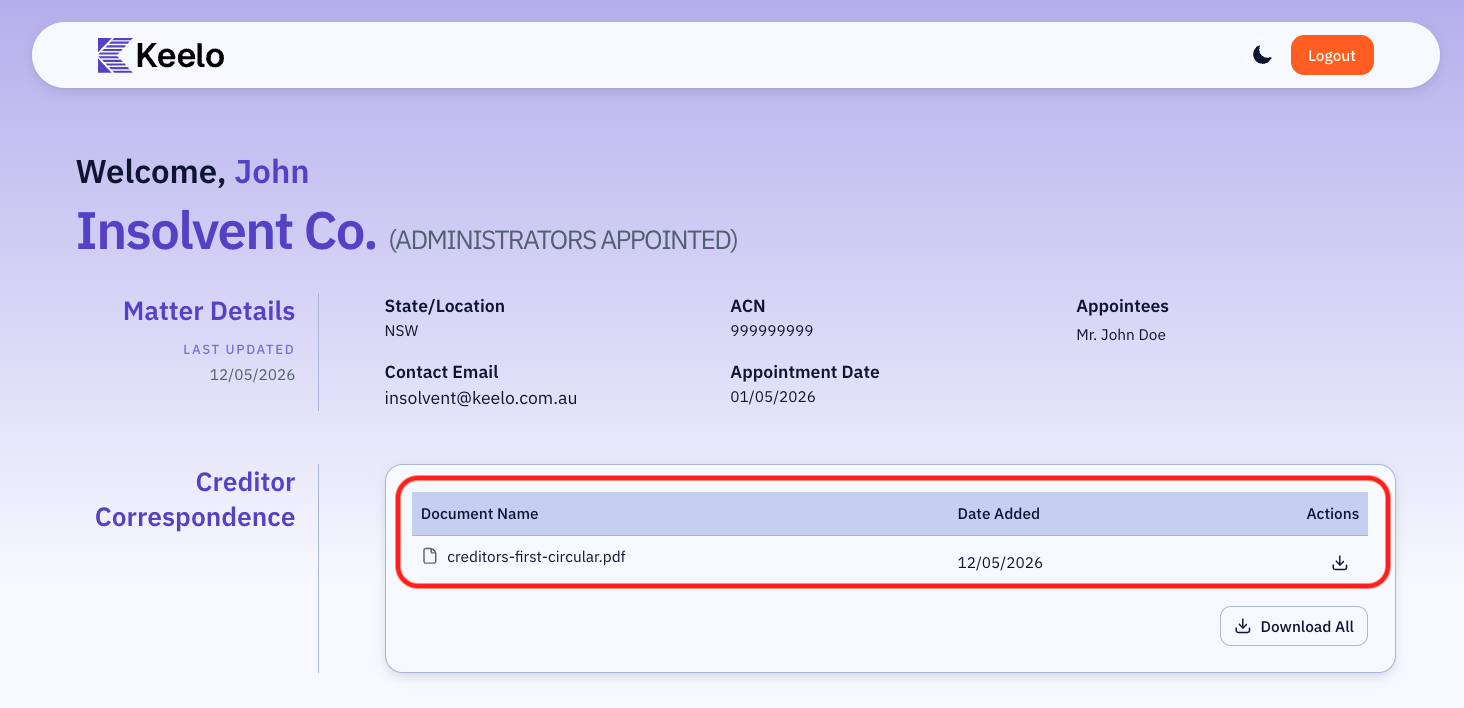
Uploaded files appear to creditors in the Creditor Correspondence section of the creditor portal homepage. Anything you upload here is visible and download-able to every creditor on this appointment.
-
Go to the Portal setup page.
-
Navigate to the Creditor Correspondence section.
-
Click the + button to add a new document.
-
In the Upload Documents dialogue, select one or more files from your computer or drag and drop them into the dialogue.
-
Click Upload. Files will be available on the creditors' portal once upload is complete.
Uploaded correspondence available on creditors' portal:
Supported files
| Setting | Limit |
|---|---|
| Supported formats | PDF, DOC, DOCX, CSV, XLSX, ZIP, RAR, 7Z, TAR, GZ |
| Maximum file size | 50 MB per file |